You moved your website to a new server last night. This morning it opens fine from the office, but your customer in Abu Dhabi still sees the old version, and email lands in the old mailbox one minute and the new one the next. You call the hosting company and they tell you to “wait for DNS propagation”. The sentence is true, but it explains nothing. In this article we explain what primary and secondary DNS are, why the website and email go down together when DNS fails, what actually happens during those hours of “propagation”, and how to move a site to a new server without any of your visitors noticing.
Quick Answer
Primary DNS is the server holding the original copy of your domain’s records; secondary DNS holds an identical copy refreshed automatically from the primary, and both answer visitors’ queries equally. “Propagation time” is not the time a change needs to reach the world: it is how long intermediate servers keep the old answer cached, set by the TTL on each record. Lower the TTL a day or two before the change, move the site, keep the old server running until that time runs out, and visitors notice nothing. If you do not yet know the record types, start with our guide to DNS records explained and come back here.
What Primary and Secondary DNS Are
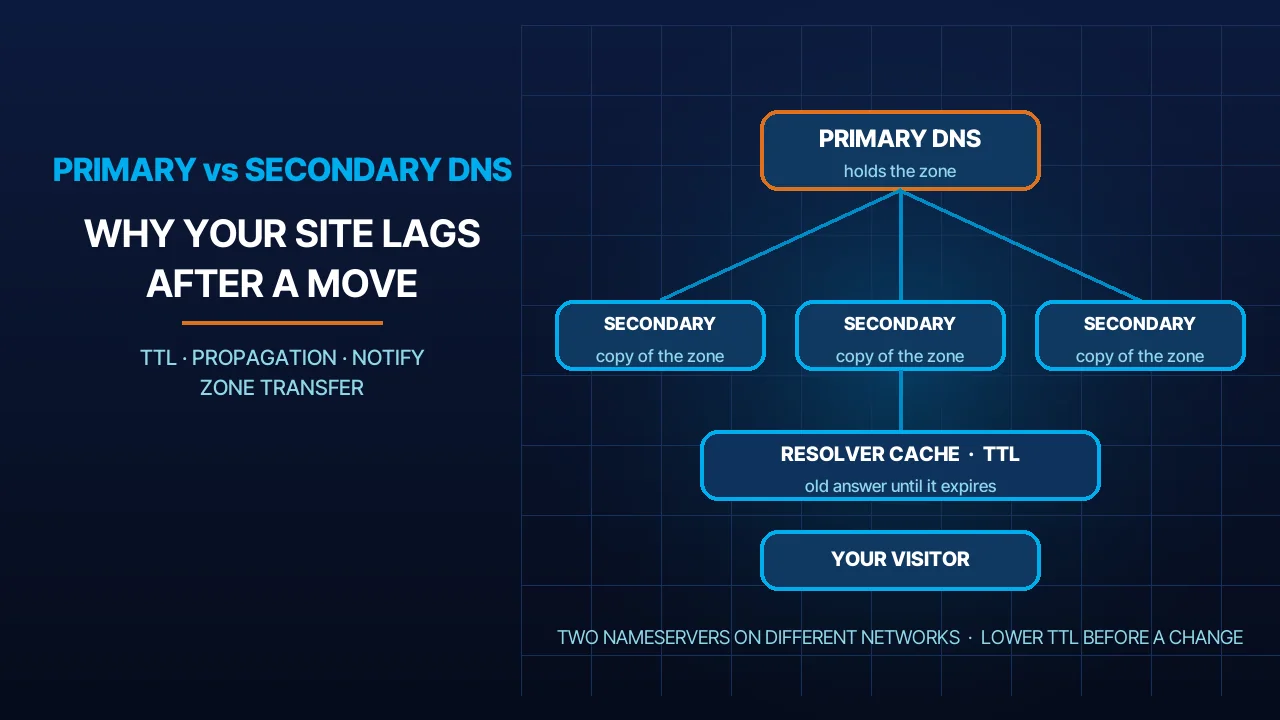
Every domain has a zone file that holds its records: the address of the server hosting the site, the mail server, verification records and so on. The primary server (also called the master) is where those records are written and edited. The secondary server (also called the slave) is never edited by hand; it copies the whole file from the primary through a process called a zone transfer, or AXFR, defined in RFC 5936. When you edit a record on the primary, the primary sends the secondary an immediate notice asking it to refresh its copy; that is the NOTIFY mechanism defined in RFC 1996.
The point many people get wrong: “secondary” does not mean “a backup that only wakes up in an emergency”. Both servers are listed together in your domain’s NS records, the resolvers looking for your site ask either of them with no preference, and they accept the answer from whichever replies. The only difference is where the writing happens: the primary is for editing, the secondary is for copying.
| Item | Primary | Secondary |
|---|---|---|
| Where records are written | Directly on it | Never written; copied from the primary |
| How it is updated | By hand or from the control panel | By AXFR when a NOTIFY arrives or the refresh timer expires |
| Does it answer visitors | Yes | Yes, equally |
| What happens if it goes down | The secondary keeps answering with its last copy | The primary keeps answering |
| Where it should sit | On the host’s network or a standalone server | On a different network and in a different location |
DNS Uptime: Why the Site and Email Go Down Together
When DNS stops, the server hosting your website keeps running at full capacity, but nobody can reach it. The browser asks “what is this domain’s address?”, gets no answer, and shows an error. The sending mail server asks “where do I deliver mail for this domain?”, finds no MX record, defers the message and bounces it back to the sender days later. That is why the website and email fall together even when the server itself is healthy. If the error appears only on your own device and nobody else sees it, the problem is usually on your device rather than the domain, and we covered that in our guide to the “DNS server is not responding” error.
This is why the two-server rule exists. The reference document on the subject states that secondary servers should be placed on different networks and in different locations from the primary, so that a single failure (a power cut, an internet provider, a data centre) does not take the whole domain down, and it discusses how many servers a zone actually needs; see RFC 2182. We follow this literally: the nameservers that host our clients’ domains sit on separate networks, not on the website’s own server.
Three roles, not one. Many of the clients we meet assume “the domain company” does everything. In reality there are three roles, which may sit with one provider or be split across three: the registrar you bought the domain from, which tells the extension’s official registry which nameservers to use; the DNS host, which runs the nameservers and holds your records; and the web host, which runs the actual server. When you register a domain through our portal you get DNS management in the same panel, and our hosting accounts include DNS on our nameservers, so the three roles sit in one place and you know whom to ask when something breaks. If you are at the very beginning, our guide on how to purchase a domain covers the first step.
What “DNS Propagation” Actually Is
There is no “propagation” in the literal sense; nobody pushes your change out to the world. What happens is the opposite: every intermediate server that asked about your domain before the change keeps the old answer in its cache for a set period, then asks again. That period is the TTL (Time To Live), a field on every DNS record that says how many seconds a caching server may hold the answer, as defined in the implementation specification, RFC 1035, and the concepts specification, RFC 1034.
Caching happens in more than one layer. When you type your site’s address, the request passes through several caches: the browser first, then the operating system, then the internet provider’s resolver that serves thousands of subscribers from a single cache, then the root servers whose list IANA publishes, then the extension’s registry servers, then your domain’s own nameservers. Any of those layers may still hold an old answer. That is why your colleague on mobile data sees the new site while you still see the old one on the office network: two providers, two caches, two different moments at which the TTL runs out.
Changing nameservers is slower than changing records. NS records, the nameservers that answer for your domain, are also cached by the extension’s registry and by the registrar on timers of their own that you do not control. So if you swap all the nameservers instead of changing a single A record, you wait longer and gain nothing.
How Long Propagation Takes, and How to Shorten It
The honest answer: it takes until the TTL that was written on the old record before you changed it runs out. If the TTL was one hour, the change completes in roughly an hour for everyone. If it was a full day, some visitors will see the old site for a full day. The trouble is that many control panels ship with long default values that nobody looks at until moving day. This is what we do when we move any site, and what we recommend:
A day or two before the change: we lower the TTL on the records we are going to change (usually A and MX) to a few minutes. The lowering itself only takes effect once the old, long value has expired from the caches, which is why we do it early rather than on moving day.
On the day: we point the record at the new server’s address. Because the TTL is now short, the old answers age out of the caches in minutes rather than hours.
Verify from more than one place: we query several public resolvers directly with dig or nslookup, such as 8.8.8.8 and 1.1.1.1, and we test from mobile data rather than from one machine on the office network. A single answer proves nothing; matching answers from different sources are the evidence.
Flush the Google Public DNS cache: Google offers a public tool that clears a given domain from its resolvers’ cache, and its page says that if the domain’s registrar or DNS hosting changed recently you should flush the main domain first and then the subdomains; see the cache flush tool. This only speeds things up for people who use Google’s resolvers; it does nothing for the local internet provider’s cache.
Once things settle: we raise the TTL back to a sensible value (hours, not minutes), because very short values multiply the queries hitting the nameservers and make every visit wait for a fresh DNS reply, which is one of the hidden causes we listed in why your website is slow.
Steps to Move a Site With No Downtime
Order matters more than speed. These are the steps, in the order we follow them, when we move a client’s site from one server to another, whether to shared hosting or to a dedicated VPS server:
- Copy the whole site to the new server, including the database, the files and the mailboxes if email is moving too. Do not touch DNS yet.
- Test the site at the new address before anyone else sees it. Add a line to the hosts file on your own machine that maps the domain name to the new IP address, so that only your machine sees the new copy while the world still sees the old one. Browse the pages, try the forms, log in to the admin panel, then remove the line.
- Lower the TTL on the A and MX records in the current DNS panel, and wait for the old value to expire.
- Switch the records, not the nameservers. Change the A record to the new server’s address, and the MX record if email moved with it. Then verify from several resolvers as above.
- Keep the old server running until the old TTL has run out for everyone, and watch its access and mail logs; when requests to it stop completely, you can switch it off. Whoever shuts the old server down the same day loses the visitors and messages still being sent to it, which is also what happens when hosting expires without renewal.
- Raise the TTL a day or two after things have settled.
Mistakes We See
Changing nameservers at the registrar instead of changing records. The client only wants to move the website, so they go to the registrar’s panel and swap all the nameservers to the new host. The result: every record moves at once, including email and verification records that were never copied into the new panel, and the wait is longer because NS changes are cached at the official registry too. Change the A record only if the website is the only thing moving.
Forgetting MX and SPF. The site moves and the email is forgotten. The MX record says where messages are delivered, and the SPF record says who may send on behalf of your domain; if either still points at the old server, incoming mail stops or outgoing mail lands in the junk folder. We walk through these records one by one in the DNS records guide mentioned above.
A single nameserver. We see it on domains set up in a hurry: one NS record pointing at the website’s own server. Any reboot of that server takes the whole domain down, website and email alike. The rule: at least two servers, on two different networks.
A TTL of a week. Some older panels set 604800 seconds, a full week, as the default. It is harmless on an ordinary day, but it means any emergency change, such as moving the site after a server failure, needs a week to reach everyone. Review your TTL values today, not on the day of the emergency.
Frequently Asked Questions
How long does DNS propagation take in the UAE?
The UAE is no different from anywhere else: the time equals the TTL that was on the old record, no more. An hour means an hour; a day means a full day. The only local variable is the internet provider’s resolver, which serves many subscribers from one cache, so mobile data may show the change before the office network.
Do I need secondary DNS if my website is small?
Yes, and it has nothing to do with the size of the site. A secondary server is the minimum, not a luxury: one nameserver means any failure on it takes the website and email down together even when the server is fine. It normally costs nothing extra; our nameservers, for example, come as at least two within the same service.
I changed the server and email stopped. Why?
The cause we see most often with our clients is an MX record that was not moved with the site, or was moved to a server with no mailboxes yet. Check that MX points at the right mail server, that SPF names the new server, and that the mailboxes exist there. If email lives elsewhere, leave MX alone.
Can DNS propagation be sped up?
Partly. You cannot force every cache in the world to forget, but you can lower the TTL a day or two before the change so old answers expire quickly, flush the Google Public DNS cache with their tool, and clear your own device and browser cache. What cannot be hurried is the visitor’s provider cache or the registry’s.
Sources
- RFC 1035: Domain Names – Implementation and Specification (accessed 2026-10-11)
- RFC 2182: Selection and Operation of Secondary DNS Servers (accessed 2026-10-11)
- RFC 1996: A Mechanism for Prompt Notification of Zone Changes (DNS NOTIFY) (accessed 2026-10-11)
- RFC 5936: DNS Zone Transfer Protocol (AXFR) (accessed 2026-10-11)
- Google Public DNS: Flush Cache (accessed 2026-10-11)
- IANA: Root Servers (accessed 2026-10-11)
Where We Are
BIGBANG ITS has planned and run technology for UAE businesses since 2003, headquartered at the Sharjah Research, Technology and Innovation Park with a branch in Business Bay, Dubai. Support runs 24/7 and the office is open Saturday to Thursday, 09:00–18:00 Gulf time. Contact us or message us on WhatsApp.
Talk to us directly — we usually reply within minutes during business hours.