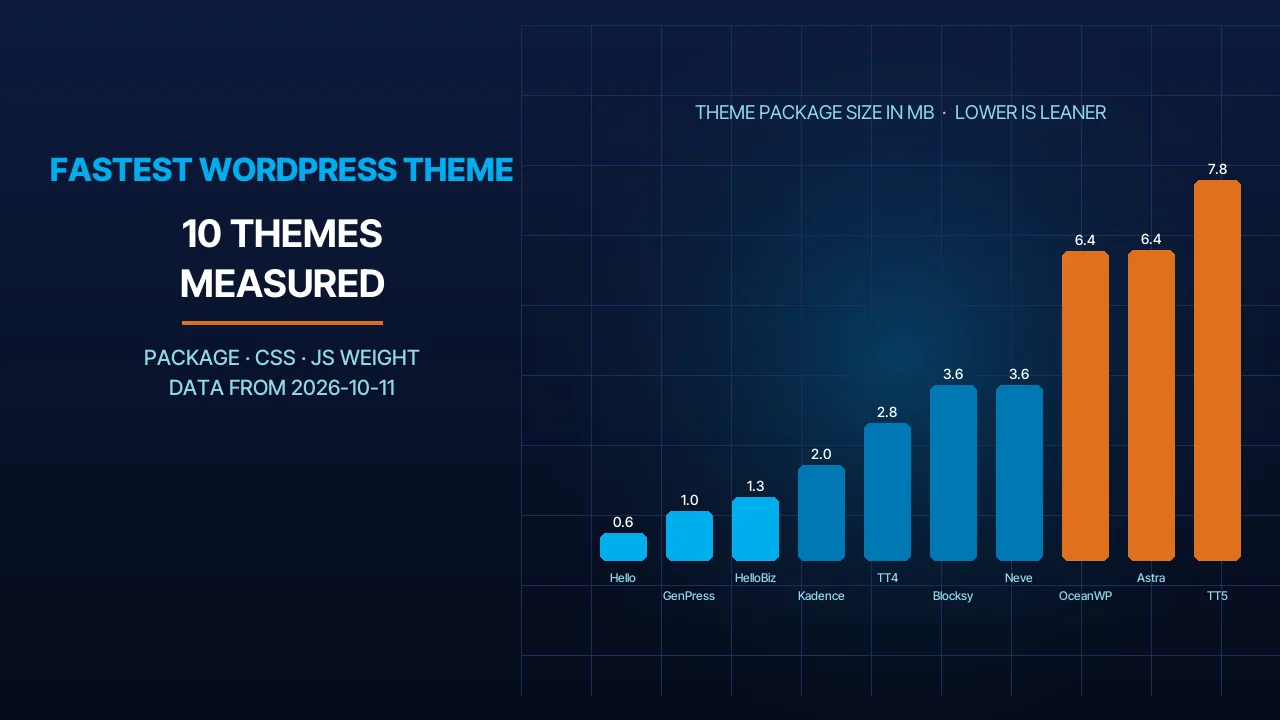
You are looking for the fastest WordPress theme because your current site opens slowly on a phone, or because you are starting a new site and want a light base. Search the phrase and you get twenty names, each describing itself as the lightest and fastest, with not one number you can check. At BIGBANG we install themes and host WordPress sites for UAE companies, and we know the name on the box is not enough. So on 2026-10-11 we downloaded 10 popular themes from WordPress.org and measured them ourselves. This article gives you the numbers as we measured them, and says plainly what they mean and what they do not.
Quick Answer
The lightest WordPress theme in our measurement is Hello Elementor: a 587 KB zip and 1,110 KB unpacked, and among classic themes GeneratePress comes first with a 1,038 KB package. But “the fastest WordPress theme” is not one name, because the theme controls only part of the load time; plugins, images and hosting decide the rest. The rule we use with our clients: pick a light theme that matches how you build (Elementor, the block editor, or classic), install it, then test the real page on PageSpeed Insights on mobile. Package weight is a good starting signal, not a verdict. The full table is below.
Why There Is No Single “Fastest Theme”
What the theme controls. The theme decides the HTML structure of the page, the CSS and JavaScript files it loads itself, the fonts it fetches, the header and footer templates, and how many styles are printed on every page. That is an important share of the load time, but not all of it.
What the theme does not control. Plugin scripts, image sizes, how long the server takes before it sends the first byte, whether a cache exists, and the PHP version running the site. On the client sites we review, the theme is usually the lightest suspect; plugins and images carry the real weight.
What Google measures. There are three Core Web Vitals: LCP (when the largest element appears) with a target of 2.5 seconds, INP (response to interaction) with a target of 200 milliseconds or less, and CLS (layout stability) with a target of 0.1 or less, all measured at the 75th percentile of page loads across mobile and desktop, per the Web Vitals page. Google documents the same metrics in Search Central as part of page experience. Note that none of the three says “theme”; they all measure the whole page as the visitor sees it.
From our experience: we have seen a light theme turn into a heavy page because of a hero slider and three font families, and a theme with a heavy package score well because the owner switched off the modules he did not use and turned on caching. That is why we measured packages, and why we spell out what the numbers do and do not mean.
How We Measured
The method. We downloaded each theme’s current package from WordPress.org on 2026-10-11 and measured the zip size, the unpacked size, the weight and count of the CSS files, the weight and count of the JavaScript files, and the weight of the font files bundled in the package. Active installs, rating and last-update date were read from the WordPress.org themes API on the same day; they are the figures you see on each theme’s page linked in the table.
The limits. Package weight is not page speed. A theme does not load all of its files on every page, only a part of them depending on settings and content. Plugins, images and hosting affect load time more than the theme does. But a lean package is a good proxy for the most a theme can put on a page, and the numbers are reproducible: anyone who downloads the same version gets the same sizes. We did not measure LCP on a demo page, because that result follows the content we put in rather than the theme, and we did not measure the paid versions.
The Results: 10 Themes in Numbers
The table is sorted from lightest to heaviest by zip size. Sizes are in KB; the number in brackets in the CSS and JS columns is the file count, and in the rating column it is the number of votes.
| Theme | Version | Active installs | Rating/100 (votes) | Last update | Zip KB | Unpacked KB | CSS KB (files) | JS KB (files) | Fonts KB | Block theme |
|---|---|---|---|---|---|---|---|---|---|---|
| Hello Elementor | 3.5.1 | 1,000,000+ | 84 (129) | 2026-08-25 | 587 | 1,110 | 43 (13) | 516 (6) | 0 | yes |
| GeneratePress | 3.6.1 | 500,000+ | 98 (1,427) | 2025-12-01 | 1,038 | 2,670 | 365 (34) | 499 (20) | 635 | no (classic) |
| Hello Biz | 1.2.2 | 100,000+ | 44 (6) | 2026-05-24 | 1,334 | 2,089 | 42 (11) | 711 (22) | 0 | yes |
| Kadence | 1.5.2 | 500,000+ | 98 (455) | 2026-07-24 | 2,021 | 8,226 | 688 (44) | 2,208 (143) | 3 | yes |
| Twenty Twenty-Four | 1.6 | 500,000+ | 76 (39) | 2026-08-19 | 2,894 | 3,069 | 2 (2) | 0 (0) | 982 | yes |
| Blocksy | 2.1.59 | 300,000+ | 100 (873) | 2026-10-08 | 3,685 | 9,560 | 450 (53) | 3,168 (406) | 3 | yes |
| Neve | 4.2.16 | 200,000+ | 94 (1,283) | 2026-10-07 | 3,697 | 7,569 | 1,326 (57) | 1,020 (46) | 0 | no (classic) |
| OceanWP | 4.2.7 | 400,000+ | 98 (5,715) | 2026-10-06 | 6,514 | 18,526 | 1,651 (103) | 1,306 (108) | 1,223 | no (classic) |
| Astra | 4.14.0 | 1,000,000+ | 98 (6,537) | 2026-09-24 | 6,547 | 21,990 | 3,544 (115) | 5,572 (79) | 40 | yes |
| Twenty Twenty-Five | 1.5 | 1,000,000+ | 80 (14) | 2026-05-20 | 8,000 | 8,428 | 4 (3) | 0 (0) | 5,748 | yes |
How we read the table:
- Lightest package: Hello Elementor at 587 KB zipped with only 43 KB of CSS. That is expected: it is an empty skeleton built for Elementor to sit on, so the page weight will come from the builder, not the theme.
- Lightest classic theme: GeneratePress at 1,038 KB, under a third of Neve (3,697) and about a sixth of OceanWP (6,514). It is rated 98 from 1,427 votes, but its last update on 2025-12-01 is the oldest in the list.
- The default themes’ weight is fonts. Twenty Twenty-Four carries 2 KB of CSS and zero JavaScript, Twenty Twenty-Five carries 4 KB of CSS and zero JavaScript, yet the latter’s package is 8,000 KB because 5,748 KB of it is bundled font files. A site does not load all of them, only the family you pick.
- Heaviest unpacked: Astra (21,990) and OceanWP (18,526), but both are modular: Astra’s package carries many optional modules that load only when enabled. A big package here means more options, not necessarily a heavier page.
- Blocksy ships 406 small JavaScript files totalling 3,168 KB, but loads few of them per page. It is the only theme rated 100 (873 votes) and has the newest update in the list (2026-10-08).
- Beware ratings with few votes. Hello Biz is rated 44 from only 6 votes, and Twenty Twenty-Five 80 from 14; those are too few to build a comparison on.
Which Theme for Which Site
Building with Elementor? Take Hello Elementor. The theme is light because it does almost nothing, and all the weight will come from Elementor and its widgets, so keep the home page lean. Hello Biz is the same skeleton plus 711 KB of JavaScript for its onboarding screen, and its rating still rests on 6 votes.
Building with the block editor? Kadence, Blocksy or Twenty Twenty-Five. Block themes are built from HTML templates and a theme.json file instead of the traditional PHP templates, per the WordPress developer handbook, which lets you customise them inside the editor without a builder plugin. If you want the fewest files, the default Twenty Twenty-Five gives you 4 KB of CSS and zero JavaScript, provided you pick a single font family.
Prefer the classic way with the Customizer? GeneratePress is the lighter of the two, Neve the more recently updated. Both also work with the block editor, but header and footer settings stay in the Customizer rather than the editor.
Arabic or bilingual site? All ten themes run right-to-left when you set the site language to Arabic, because WordPress itself handles the flip. But in our experience with UAE client sites, the difference shows in the details: the mobile menu, arrow icons, spacing around buttons, and the Arabic font chosen. Open the theme’s demo, switch it to Arabic, and browse it on a phone before you pay for the pro version.
And if you are building a site for a hosting company specifically, we have a separate article on WordPress themes for hosting companies; this one answers the speed question only.
What Makes a Fast Theme Slow
Visual page builders. Every Elementor widget, or its equivalent in another builder, adds CSS and JavaScript to the page. A theme with 43 KB of CSS can become a page of several hundred KB after twenty widgets. Build the home page with as few elements as you can.
A hero slider. It loads several large images plus a script to move them, and the largest element on the page (the one LCP measures) becomes a moving image. One static, compressed, correctly sized image does the job in most of what we have seen at clients.
Google Fonts. Every weight of every family is a separate file requested from an external server. Pick one or two families and two or three weights, and host the font files on your own server where you can.
Unused modules. Astra, OceanWP and Kadence each have a module panel; switch off what you do not use. A big package does no harm as long as its modules are off.
No cache. Without a page cache, every visit runs PHP and queries the database again. Server-level caching beats a caching plugin because it answers before WordPress even starts.
An old PHP version. WordPress recommends PHP 8.3 or greater, MariaDB 10.11 or greater or MySQL 8.0 or greater, and HTTPS, and notes that it still works with PHP 7.4 and above but that those versions have reached their official end of life, per the requirements page. Check the PHP version in your hosting panel before you blame the theme.
After every change, test the same page on PageSpeed Insights on mobile, not just desktop; a phone is what most visitors to our clients’ sites use.
Hosting Is Half the Equation
The same theme on two different servers gives two different load times, and we see this with every client who moves a site to us. Server response time comes before the first theme file, and no theme can make up for it. If your site is slow now, start with why your website is slow before you swap the theme; in many of the cases we have reviewed the cause was the hosting or the images, not the theme.
Our WordPress hosting runs LiteSpeed with server-level caching, which means a cached page is sent before PHP runs. We explain the difference from ordinary hosting in WordPress hosting vs web hosting, and compare the options in our WordPress hosting services comparison and in best web hosting in the UAE for WordPress. The current price is on the portal, linked from the WordPress hosting page.
Checklist Before You Buy
- Decide how you will build first: Elementor, the block editor, or classic. The theme follows the method, not the other way round.
- Check the last-update date and the number of votes on the theme’s WordPress.org page, not the rating alone.
- Open the demo on a phone, and switch it to Arabic if your site is Arabic.
- Run the demo page through PageSpeed Insights; if the demo itself is slow, your page will not be faster.
- Ask: which modules can be switched off, and can the fonts be hosted locally?
- Make sure your hosting runs PHP 8.3 or greater and has server-level caching.
- Install the theme on a staging copy, add your real content, then measure. The number that matters is your own page’s.
Frequently Asked Questions
What is the fastest free WordPress theme?
In our measurement on 2026-10-11 the lightest package was Hello Elementor at 587 KB zipped, and the lightest classic theme was GeneratePress at 1,038 KB. A light package does not guarantee a fast page, though; plugins, images and hosting decide the rest, so install the theme on a staging copy and measure your real page on a phone.
Is Astra faster than GeneratePress?
GeneratePress has the far lighter package: 1,038 KB against 6,547 for Astra. But Astra is modular and its optional modules load only when enabled, so the gap on an actual page is smaller than the table suggests. On a simple site we do not see a decisive difference between them; the choice comes down to the building method you prefer.
Does changing the theme make a site faster?
Sometimes, and not every time. If your site runs a slider, several fonts and dozens of plugins on hosting without a cache, swapping the theme alone will not change much. Test the page on PageSpeed Insights first and read where the time goes: the server, the images, or the scripts, and then decide whether the theme is the problem.
Do WordPress themes support Arabic?
The ten themes in the table run right-to-left when the site language is set to Arabic, because WordPress handles the direction flip. The difference between one theme and another shows in the menu details, the icons and the Arabic font chosen, so open the demo in Arabic on a phone before buying the pro version.
Sources
- Web Vitals (accessed 2026-10-11)
- Understanding Core Web Vitals and Google search results (accessed 2026-10-11)
- WordPress Requirements (accessed 2026-10-11)
- What Is a Theme? – Theme Handbook (accessed 2026-10-11)
- PageSpeed Insights (accessed 2026-10-11)
- Hello Elementor on the WordPress theme directory (accessed 2026-10-11)
Where We Are
BIGBANG ITS has planned and run technology for UAE businesses since 2003, headquartered at the Sharjah Research, Technology and Innovation Park with a branch in Business Bay, Dubai. Support runs 24/7 and the office is open Saturday to Thursday, 09:00–18:00 Gulf time. Contact us or message us on WhatsApp.
Talk to us directly — we usually reply within minutes during business hours.