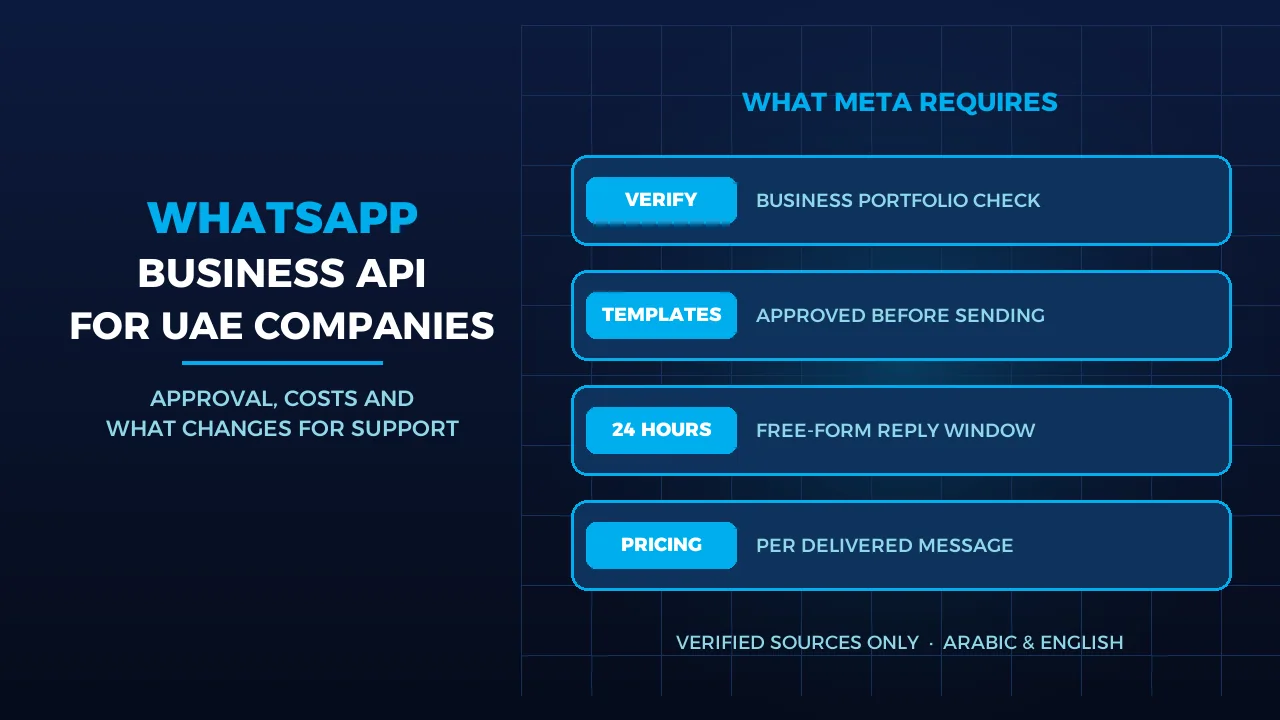
Most UAE companies already sell and support on WhatsApp, usually from a receptionist’s phone or a single shared handset. That works until the team grows, a customer writes at 23:00, or the person holding the phone goes on leave. The WhatsApp Business API, which Meta now calls the WhatsApp Business Platform, is how a company moves that number into a shared system with several agents, automation and a CRM. It also brings Meta’s rules: business checks, approved message templates, a 24-hour reply window and per-message charges that changed again on 1 October 2026.
Quick Answer
The WhatsApp Business API lets several staff, bots and your CRM work from one business number. Meta charges per delivered message since 1 July 2025, by category (marketing, utility, authentication, service) and by the recipient’s country code; the UAE has its own line on Meta’s rate card. Since 1 October 2026 each business number gets 1,000 free service messages a month, and replies after that are charged. Outside the 24-hour window you can only send approved templates, and only to people who opted in. We run it for clients inside BIGBANG Cloud CX, with the shared inbox, routing and AI described in our Cloud CX overview.
What the API Changes Compared With the WhatsApp Business App
The WhatsApp Business app is built for one person, or a few, answering customers one-to-one on a phone. The API is built for a team and for systems. The difference shows up in four places.
- One number, many agents. Conversations land in a shared inbox, each one assigned to a named person with notes and full history, instead of sitting on one handset.
- Routing. Messages go to sales, support or a branch based on the content, the time of day or the customer record.
- CRM context. The agent sees previous orders, bookings and calls next to the chat, so the customer does not repeat themselves.
- Bots with a human behind them. A bot can answer the routine questions, and anything it cannot answer goes to a person with the conversation attached.
The number question. Meta states that a number already in use with WhatsApp cannot be registered unless deleted first. The number must be yours, have a country and area code (short codes are not supported) and be able to receive a voice call or SMS for verification. There is one exception: through a partner’s onboarding flow, a number on the WhatsApp Business app can connect to the platform and keep the app, with chat history kept in sync. It needs app version 2.24.17 or later, and that number is capped at 20 messages per second. Our guide to business phone numbers in the UAE covers choosing the line itself.
Approval: What Meta Checks Before You Can Scale
Business portfolio and verification. Everything sits under a Meta business portfolio. A new portfolio can message 250 unique users per 24 hours outside a customer service window. Verifying your business is one of the paths to 2,000. The other is sending 2,000 delivered template messages to unique users within 30 days using high-quality templates. After 2,000, Meta raises the limit automatically to 10,000, then 100,000, then unlimited, when your quality stays high and you used at least half of your current limit in the last 7 days. The limit is shared by every number in the portfolio.
Display name. You give a display name when you register the number. When you reach a higher messaging limit, Meta verifies the display name automatically against its guidelines. You can change it up to 10 times in 30 days, and after each approved change the number must be re-registered within 14 days.
Templates. Any message you start, such as an appointment reminder, an invoice notice or an offer, must be an approved template. Each template is categorised as marketing, utility or authentication and reviewed automatically when created or edited; only templates with an APPROVED status can be sent. Meta does not translate templates, so a UAE business needs an Arabic and an English version of each, and each one counts toward the template limit.
Opt-in and quality. Meta requires opt-in before you message anyone. The opt-in must name your business, say the person is agreeing to messages from you, and comply with local law. A website form, SMS, an IVR menu or a signed paper form all work. If customers block or report you and quality stays low, Meta rate-limits the business. In the UAE, the Personal Data Protection Law, Federal Decree Law No. 45 of 2021, prohibits processing personal data without the owner’s consent except in specific cases, so we treat a clear, recorded opt-in as the starting point for every list.
What Meta Charges in October 2026
Meta’s pricing page was updated on 30 September 2026. These are the points that matter for a UAE company:
- You pay per delivered message, and only for messages your business sends.
- The rate depends on category and market. The market is the recipient’s country calling code; +971 numbers are charged the UAE rate. Meta raised the UAE marketing rate on 1 October 2026.
- Service replies are no longer free without limit. Each business number gets 1,000 free service messages a month, which reset monthly and do not roll over. From the 1,001st, service messages are charged. Without a payment method, Meta stops delivering service messages once the free tier is used.
- Utility messages inside the window are charged again from 1 October 2026; they had been free since 1 July 2025.
- Click-to-WhatsApp ads open a free window. If a customer writes from one of these ads on a phone and you reply within the customer service window, a free entry point window opens for up to 7 days, and marketing, utility, authentication and service messages in it are not charged.
- Volume tiers lower the utility and authentication rates as monthly volume grows.
- AED billing has been available since 1 April 2026. The currency is chosen when the account is created.
- Price changes happen only on the first day of a quarter.
We do not quote per-message figures here because Meta updates them quarterly; the current UAE rates are on Meta’s published rate cards.
| Category | Typical use | When you can send it | How Meta charges |
|---|---|---|---|
| Marketing | Offers, cart reminders | Any time, approved template, opted-in user | Per delivered message, UAE rate |
| Utility | Order, booking, invoice updates | Any time, approved template | Per delivered message, including inside the window; volume tiers |
| Authentication | One-time passwords | Any time, approved template | Per delivered message; volume tiers |
| Service | Free-form replies by agents or bots | Only inside the 24-hour window | First 1,000 a month per number free, then per message |
The 24-hour window. When a customer messages or calls you, a 24-hour customer service window opens, and it resets each time they write again. Inside it, agents can send normal replies, images and documents. Once it closes, only templates are allowed. For a support team, this means a ticket left until the next morning may need a template to restart it.
What Changes for Your Support Team With BIGBANG Cloud CX
BIGBANG Cloud CX connects WhatsApp through the WhatsApp Business Platform, together with Facebook Messenger, Instagram and business calls, in one workspace where each conversation stays attached to one customer record.
- Shared inbox with ownership. Each conversation is assigned to a named person, with internal notes and the full history beside it, so a handover during leave or a shift change loses nothing.
- Routing by context. Smart routing sends a conversation to the right department, employee or group.
- CRM in the chat. Customer profiles keep conversation history, notes, bookings and where the customer came from.
- AI with a human hand-off. AI agents answer in Arabic and English from the business data you approve. In our configuration, a question outside that data goes to a named department or employee with the full conversation attached.
- Visibility. Live reports show response times, open threads and team performance.
We handle the Meta side as part of setup: business portfolio, number registration, display name, templates in both languages and the opt-in wording. If calls are part of the same team, see how we set up a contact centre for a small business and 3CX integration with your CRM.
Three Decisions to Make Before You Apply
- Which number. Keep the number customers already know and move it to the platform, or start with a new line. Decide before go-live, because a number active on WhatsApp has to be deleted from it or connected through a partner flow.
- Which messages you will start. List the reminders, confirmations and offers you will send first, write each in Arabic and English, and label it utility, marketing or authentication. This is your template list and your cost model.
- Who owns the inbox. Name the people, departments and working hours, and decide what the bot answers and when it hands over. The service-message free tier is per number, so check your expected reply volume against 1,000 a month.
When those three are clear, we can move a team onto BIGBANG Cloud CX with WhatsApp connected and the Meta checks done.
Frequently Asked Questions
Is the WhatsApp Business API free for UAE companies?
No. Meta charges per delivered message from your business, at a rate set by message category and by the recipient’s country code. Since 1 October 2026, each business number gets 1,000 free service messages a month, and replies after that are charged. Messages customers send you are never charged, and current UAE rates are on Meta’s rate card.
Can I keep my current WhatsApp number?
Usually, yes. Meta does not register a number active on WhatsApp until it is deleted there. The alternative is a partner onboarding flow that connects a WhatsApp Business app number to the platform while you keep using the app, with history synced. That route requires app version 2.24.17 or later and limits the number to 20 messages per second.
How many customers can we message per day?
A new Meta business portfolio can message 250 unique users outside the customer service window in a moving 24 hours. Verifying your business, or sending 2,000 good-quality template messages within 30 days, raises that to 2,000. After that, Meta increases the limit automatically to 10,000, 100,000 and then unlimited, as long as your quality stays high.
Sources
- Meta for Developers: Pricing on the WhatsApp Business Platform (accessed 2026-10-22)
- Meta for Developers: Messaging limits (accessed 2026-10-22)
- Meta for Developers: Display names (accessed 2026-10-22)
- Meta for Developers: Templates overview (accessed 2026-10-22)
- Meta for Developers: Business phone numbers (accessed 2026-10-22)
- Meta for Developers: Onboarding WhatsApp Business app users (accessed 2026-10-22)
- Meta for Developers: Obtaining user opt-in (accessed 2026-10-22)
- The UAE Government portal: Data protection laws (accessed 2026-10-22)
Where We Are
BIGBANG ITS has planned and run technology for UAE businesses since 2003, headquartered at the Sharjah Research, Technology and Innovation Park with a branch in Business Bay, Dubai. Support runs 24/7 and the office is open Saturday to Thursday, 09:00–18:00 Gulf time. If you want WhatsApp Business API running with your team inside BIGBANG Cloud CX, contact us or message us on WhatsApp.
Talk to us directly — we usually reply within minutes during business hours.