Passkeys let your staff sign in to Microsoft 365 and Google with a fingerprint, a face scan or a PIN instead of a password. For a UAE company that already switched on two-factor authentication, the next question is practical: how do we retire passwords without locking anyone out? Picture a 40-person company in Dubai or Sharjah, with a mix of iPhones and Android phones, a shared info@ mailbox and one person who holds the admin account. This guide gives that company a rollout order, a recovery plan and an honest list of what will not move yet.
Quick Answer
A passkey is a key pair: the private key stays on the user's side (on a device, or encrypted with a sync provider) and the service holds only the public key, so a passkey sign-in gives a fake page no password to steal. On Microsoft Entra ID, passkeys are available in all editions, including Free. Forcing their use takes Conditional Access, which needs Entra ID P1. Google Workspace admins turn on “skip passwords” first. Start with admins, then staff, then your own apps. Register two methods per person, so a lost phone does not become a lockout, and keep our 2FA guidance on anything passkeys cannot reach.
What a Passkey Is, and How It Differs from 2FA
The FIDO Alliance calls passkeys a password replacement technology. When you sign in, you approve with the same fingerprint, face or PIN that unlocks your phone or computer. Your device then proves it holds the private key. Microsoft notes that a passkey works only for the site or app it was made for, which is why a look-alike login page gets nothing from it. The standards behind it, WebAuthn (the browser part) and CTAP, are known together as FIDO2.
Two-factor authentication keeps the password and adds a second step. A passkey changes the shape of that advice in three ways:
- It covers both steps. Google describes a passkey as covering first and second-factor authentication. On an account with 2-Step Verification, the passkey bypasses the second step.
- It does not switch 2-Step Verification on. Google says enrolling a passkey does not turn on 2SV, and turning on skip passwords does not remove the user’s password. That old route stays open, so keep 2SV active behind it.
- The rest of our 2FA advice still holds. Two methods per person, no recovery codes inside the mailbox they protect and a written offboarding step all carry over from our 2FA guide for business. That guide already ranks passkeys and hardware keys as the strongest option.
Synced or Device-Bound: Which Passkey for Whom
FIDO separates synced and device-bound passkeys: the first moves between a user’s devices through a cloud service, and the second never leaves a single device. Microsoft’s deployment guide recommends a different type for each group of users.
| Question | Synced passkey | Device-bound passkey |
|---|---|---|
| Where it lives | Across the user’s devices, through a provider such as Apple Keychain or Google | On one device, such as a FIDO2 security key or Microsoft Authenticator |
| Microsoft’s recommendation | Everyone else | Admins, people with access to sensitive data and highly regulated users (FIDO2 key first, Authenticator as an alternative) |
| If one phone is lost | Copies on the user’s other devices keep working | The user needs a second registered method |
| Practical effort | Nothing to issue, but an encrypted copy of the key sits in the provider’s cloud | Keys to buy, issue and track, or an app to install on every phone |
Our view for a company of 5 to 300 people: device-bound at least for whoever can change the tenant, the domain or the money, and synced for the rest.
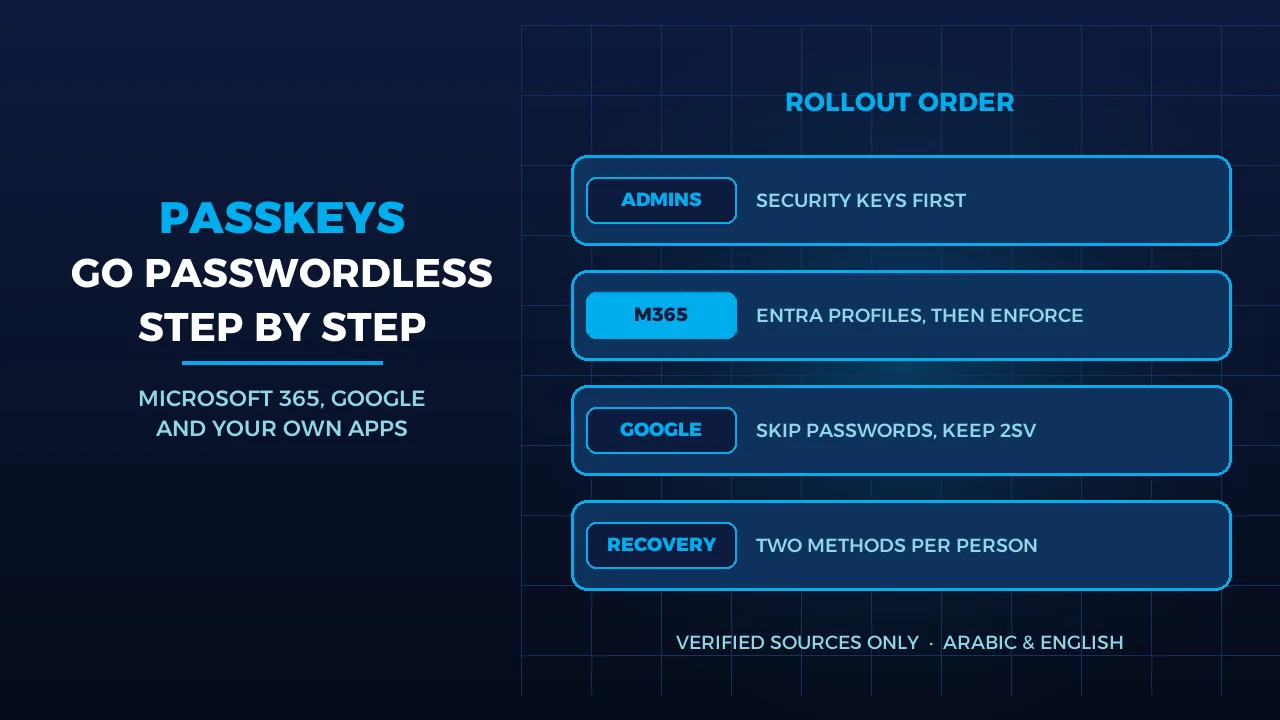
Rollout Order for 5 to 300 Staff
A 10-person company can move through these steps quickly. A 300-person company should move group by group, as Microsoft’s guide does.
- Check the devices. For phishing-resistant sign-in, Microsoft lists minimum versions: Windows 10 22H2 for Windows Hello for Business, Windows 11 22H2 for the best passkey experience, macOS 13, iOS 17 and Android 14. Its guide suggests security keys for Android 13 users who cannot use synced passkeys. Google’s floor is lower: Windows 10, macOS Ventura, ChromeOS 109, Android 9 and iOS 16.
- Admins first. Microsoft says deployments are typically piloted with admins, then widened to everyone else. Register two methods for each admin before anything is enforced.
- Microsoft 365 next. In Entra, turn on passkey profiles and set “Allow self-service set up” to Yes, or users cannot register from Security info. Up to 3 profiles are supported, enough for “admins” and “everyone else”. Opting in to profiles cannot be undone. Synced passkeys must be selected in a profile. New users can start with a Temporary Access Pass, then register a first passkey that works on other devices too.
- Then enforce. Registration and sign-in need no licence, but Microsoft recommends at least Entra ID P1 because P1 is what lets you enforce through Conditional Access. Check whether your plan includes it. Run the policy in report-only mode first and leave your break-glass accounts out of it.
- Google Workspace, if that is your suite. An admin ticks “Allow users to skip their password” under Security, Authentication, Passwordless, for the whole company or one organisational unit. Each user then turns it on and adds a passkey. Google warns that a new passkey may take 7 days to be available at sign-in, so leave a gap before any cut-over. Google’s admin page lists supported editions only for monitoring passkey usage, not for the setting itself.
- Your own apps last. The shorter route is single sign-on: integrate the app with Entra and it inherits the sign-in you already fixed. For an app with its own login, your developer adds WebAuthn on the website. The passkey is tied to a web domain, the RP ID, so settle the domain before you start.
Recovery: Lost Phone, Leaver, Shared Mailbox
Write this down before the rollout.
- Lost phone. Microsoft recommends at least two authentication methods per user for exactly this case. The user signs in with the second one and removes the lost device’s passkey. Google’s help page gives the same instruction for a lost or stolen device.
- Every method lost. On Microsoft 365, an admin issues a Temporary Access Pass, the route Microsoft describes for new users or users without MFA, so enable its policy before you need it. Verify the person first by voice or face to face, because this step is what an attacker will try to talk your helpdesk into.
- Leaver. Disable the account first. On Entra, delete the passkey from the user’s authentication methods. On Google, an admin removes the user's passkeys in their security settings, then resets the password and sign-in cookies. Android creates passkeys automatically, and Google warns that a cookie reset alone lets the person sign back in and get a new one. A synced copy may remain in a personal Apple or Google account. The service checks each sign-in against the public key it holds, so deleting the passkey on your side is what ends that copy’s use.
- Shared mailboxes. Microsoft says a shared mailbox is not for direct sign-in: block sign-in on its account and keep it blocked. Delegates reach it through their own mailbox, so info@ needs no passkey of its own. Each delegate’s personal passkey does the work.
- Shared devices. Google says to create passkeys only on devices you personally own and use, because anyone who can unlock the device can reach the account. A shared office PIN defeats the point.
- Renamed users. If a user’s sign-in name (UPN) changes, Microsoft says they must delete the old passkey and add a new one. Plan for it before a rebrand.
What Will Not Move Yet
- Guest accounts. Entra does not support passkey registration for internal or external guests, so outside accountants and consultants added as guests cannot register one in your tenant.
- The password itself, for now. Google’s guidance for developers is to keep existing sign-in methods during the move, since some users cannot use passkeys yet, while warning that the old method remains a weak spot.
- Older apps and app passwords. Anything still using them sits outside this work. Our 2FA guide covers how to audit them.
- Everything without passkey support. Before you assume your bank, registrar, control panel or accounting system can take a passkey, check that vendor’s own documentation. Where it cannot, strong 2FA stays the control, and the network security checklist covers the rest.
- A legal deadline. This article rests on vendor documents, not a review of UAE regulation, and none of them names passkeys as a legal requirement. If your sector is regulated, ask your compliance adviser.
Three Decisions to Make
- Which accounts get security keys? List everyone who can change the tenant, the domain or a payment, and give those people a device-bound method.
- Will you enforce, or only offer? Offering needs no extra licence on Entra. Forcing it takes P1 on Microsoft 365. If you are still choosing a suite, see Microsoft 365 vs Google Workspace and our business email page.
- Who owns recovery? Name one person who verifies identity, issues temporary access and removes passkeys when someone leaves, with a named backup. Our two-factor authentication service supports TOTP and U2F across web apps, cloud services and VPNs, which is the layer to keep on systems that stay outside passkeys.
Frequently Asked Questions
Do passkeys replace two-factor authentication?
For sign-ins that use one, yes: the passkey covers both factors because it needs your device and your fingerprint, face or PIN. But the password usually remains on the account, and Google does not turn on 2-Step Verification for you. Keep 2FA active until a policy blocks password sign-in.
Do we need extra licences for passkeys on Microsoft 365?
Not to register and use them. Microsoft says passkeys are available in all Entra ID editions, including Free, with no extra licence. Forcing staff to use them through Conditional Access needs Entra ID P1, so check whether your current plan includes it before you promise a passwordless date.
What if an employee will not use a personal phone?
Issue a FIDO2 security key instead. Microsoft lists security keys as an alternative for staff who are not admins, and Google accepts FIDO2 keys for passkeys too. Register a second method as well, because a single lost key without a backup means a call to your administrator.
Sources
- FIDO Alliance — FIDO Passkeys: Passwordless Authentication (accessed 2026-11-05)
- Microsoft Learn — How to enable passkeys (FIDO2) in Microsoft Entra ID (accessed 2026-11-05)
- Microsoft Learn — Plan a phishing-resistant passwordless authentication deployment in Microsoft Entra ID (accessed 2026-11-05)
- Microsoft Learn — Get started with a phishing-resistant passwordless authentication deployment in Microsoft Entra ID (accessed 2026-11-05)
- Microsoft Learn — About shared mailboxes in Microsoft 365 (accessed 2026-11-05)
- Microsoft Learn — Passkeys (FIDO2) authentication method in Microsoft Entra ID (accessed 2026-11-05)
- Google Workspace Help — Allow users to skip passwords at sign-in (accessed 2026-11-05)
- Google Account Help — Sign in with a passkey instead of a password (accessed 2026-11-05)
- Google Workspace Help — Manage a user's security settings (accessed 2026-11-05)
- Google for Developers — Passkeys developer guide for relying parties (accessed 2026-11-05)
Where We Are
BIGBANG ITS has planned and run technology for UAE businesses since 2003, headquartered at the Sharjah Research, Technology and Innovation Park with a branch in Business Bay, Dubai. Support runs 24/7 and the office is open Saturday to Thursday, 09:00–18:00 Gulf time. To plan passkeys and account recovery for your own team, contact us or message us on WhatsApp.
Talk to us directly — we usually reply within minutes during business hours.